What Is Yet Another Config (YACL)?
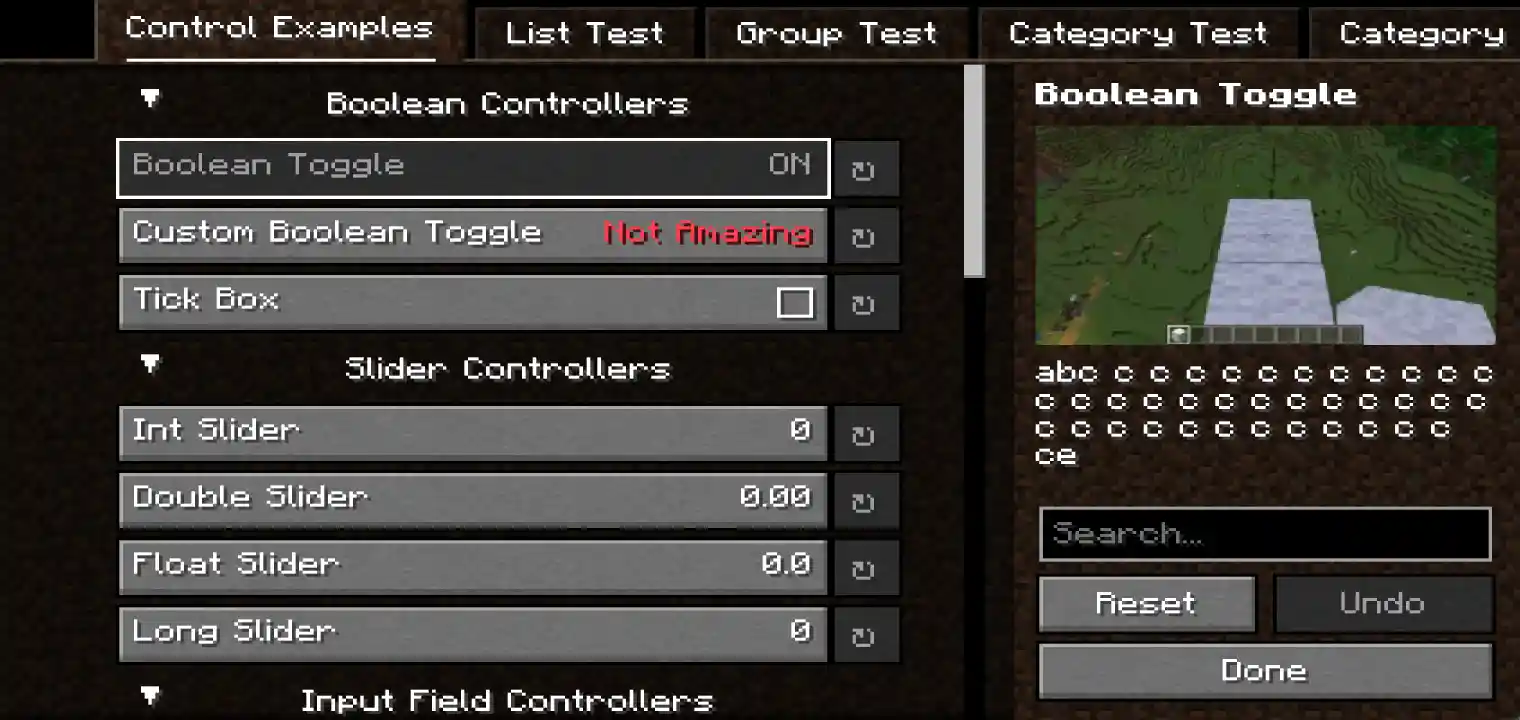
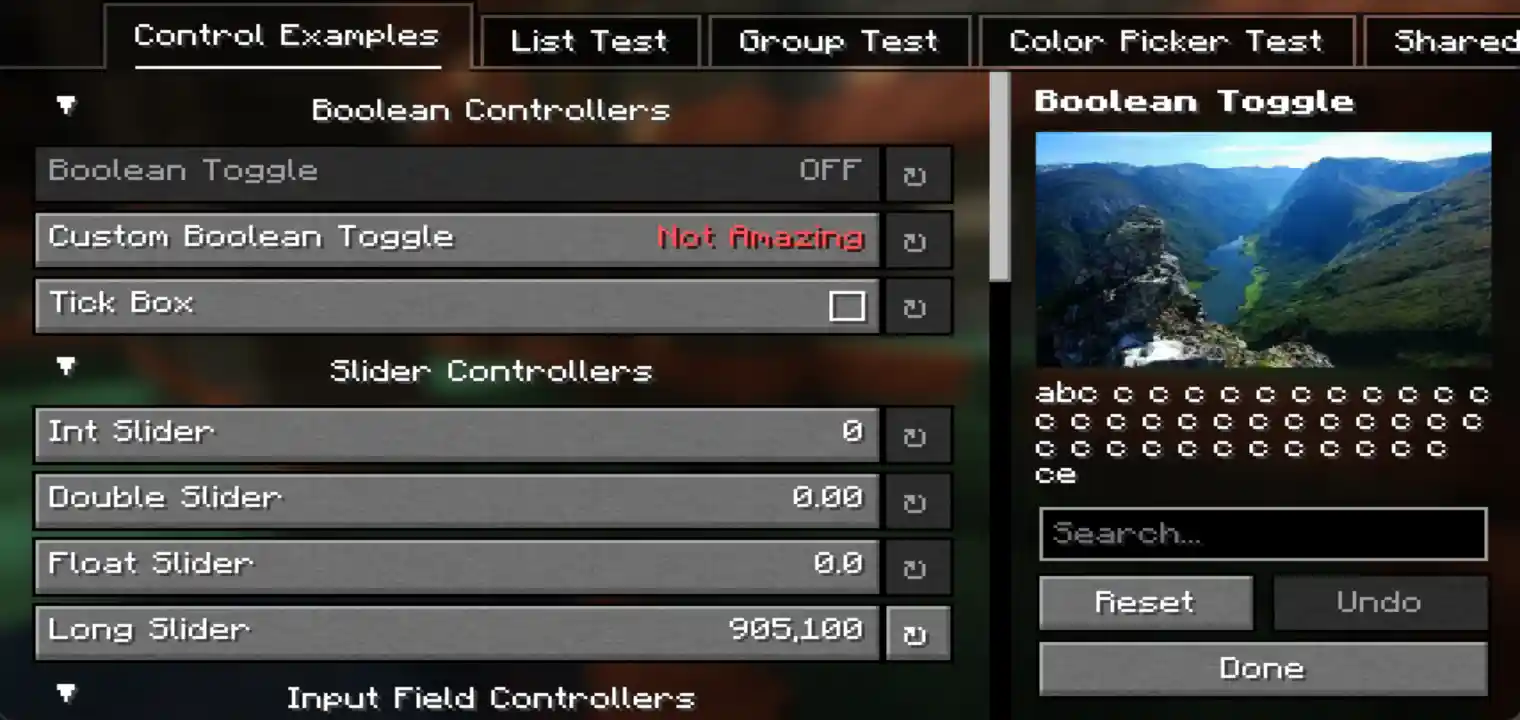
Yet Another Config, usually shortened to YACL, is a Minecraft configuration library that lets mods build interactive settings screens of their own.
It provides a framework for displaying mod settings in a structured and user-friendly interface.
Instead of requiring players to manually open configuration files and edit values, YACL allows settings to be managed through Minecraft menus.
A mod using YACL can provide options such as:
- Toggle buttons
- Sliders
- Selection menus
- Text fields
- Grouped settings
- Advanced configuration sections
The goal of YACL is to make configuration easier for both mod developers and players.
Why Do Minecraft Mods Need Configuration Libraries?
Plenty of Minecraft mods ship with features that players are expected to tune, from simple toggles to long lists of values.
For example, a mod may allow users to change:
- Display options
- Gameplay behavior
- Controls
- Performance settings
- Feature availability
Without a configuration system, players may need to manually edit files.
This creates several problems:
- Difficult setup process
- Confusing configuration files
- Higher chance of mistakes
- Poor user experience
A configuration library solves this by providing a consistent interface.
The Role Of YACL In Minecraft Modding
Within a modded setup, the library works as the bridge between a mod and the options it offers its players.
A developer can use YACL to create a configuration screen where players can easily modify available settings.
Instead of creating a complete menu system from the beginning, developers can use YACL's existing framework.
This provides:
- Faster development
- Better organization
- Consistent menus
- Easier user interaction
How Does Yet Another Config Work?
It works by letting a mod declare the settings it supports and then presenting those settings through a proper configuration interface in game.
The general process is:
- A mod creates configurable options
- YACL organizes those options
- Minecraft displays them in a menu
- The player changes settings
- The mod applies those changes
The player does not need to understand the internal configuration system.
They simply interact with a clean menu.
YACL Configuration Screens Explained
For many players, the clearest reason to choose mods built on this library is the configuration experience itself.
A YACL configuration screen can organize settings into different sections.
Examples include:
- General settings
- Performance settings
- Visual options
- Advanced controls
This makes large configuration systems easier to navigate.
Types Of Settings Supported Through YACL
Mods can present many kinds of options through these screens, and each option type suits a different kind of choice.
Boolean Settings
Boolean settings usually represent two choices:
Examples:
- Turn feature on/off
- Enable an option
- Disable an effect
These are commonly displayed as switches or checkboxes.
Numeric Settings
Numeric options allow players to adjust values.
Examples:
- Distance settings
- Amount controls
- Speed values
These may appear as sliders.
Selection Options
Some settings require choosing from multiple options.
Examples:
- Different modes
- Display choices
- Behavior options
YACL can present these choices through selection menus.
Text-Based Settings
Some mods allow users to enter text values.
Examples:
- Names
- Labels
- Custom messages
YACL can provide interfaces for managing these inputs.
Grouped Configuration Options
Large mods may contain many settings.
YACL helps organize them into groups.
For example:
- General
- Basic mod behavior.
- Visual
- Appearance-related options.
- Advanced
- More technical settings.
This organization improves usability.
Why Players Use Yet Another Config
Players gain the most visible benefit, because adjusting a mod stops being a file editing chore and becomes a normal part of playing.
Instead of searching through files, they can adjust settings directly inside Minecraft.
Benefits include:
Easier Configuration Management
Players can modify settings without manually editing files.
Better Understanding Of Options
Menus can include descriptions explaining what settings do.
Faster Customization
Players can quickly change settings while testing different gameplay experiences.
Improved User Experience
A clean interface makes complex mods easier to use.
Why Mod Developers Use YACL
The library is just as valuable on the other side of the screen, for the people building the mods themselves.
Mod developers use it because creating configuration interfaces manually can require additional work.
YACL provides ready-made systems that help developers build configuration menus more efficiently.
Benefits For Developers
Developers building configuration screens by hand face the same work again and again, including:
- Faster configuration screen creation
- Organized settings
- Consistent interface design
- Easier maintenance
YACL And Fabric Minecraft Mods
The library is most at home inside the Fabric ecosystem, where a large share of its dependent mods are built.
Many Fabric mods use external libraries to provide additional functionality.
YACL can become one of those required libraries when a mod depends on its configuration system.
Players installing a YACL-based mod may need to install YACL separately.
YACL Installation Overview
Adding the library to a setup follows much the same routine as installing any other Minecraft mod library file.
Before installation, users should have:
- Minecraft Java Edition
- Compatible mod loader
- Correct YACL version
- Mods that require YACL
Basic installation steps:
Step 1: Check Requirements
Before downloading YACL, check:
- Minecraft version
- Mod loader compatibility
- Required version
Step 2: Download The Correct YACL File
Choose the version that matches your Minecraft setup.
Using an incorrect version may cause errors.
Step 3: Open Minecraft Mods Folder
Locate your Minecraft directory and open the mods folder.
Step 4: Add YACL File
Place the downloaded YACL file inside the mods folder.
Do not extract the file unless required.
Step 5: Launch Minecraft
Start Minecraft with the correct mod loader profile.
If the required dependencies are installed correctly, YACL will load with compatible mods.
How To Use YACL With Minecraft Mods
Once everything is installed, players meet the library through the menus of the mods that depend on it.
The process is simple:
- Open the mod configuration menu
- Select available settings
- Adjust options
- Save changes
The exact menu location depends on the mod using YACL.
YACL Configuration Management
Careful configuration management is what keeps a modded setup stable week after week instead of slowly drifting into errors.
Players should:
- Change settings carefully
- Understand options before modifying them
- Keep backups before major changes
Large mod collections may contain many configuration systems, so organization becomes important.
YACL Compatibility Overview
Compatibility with the library rests on a few checks that are worth running before anything is installed, including:
- Minecraft version
- Mod loader
- Required mod versions
Before installing YACL, check that it matches the mod requiring it.
Using incompatible versions may result in:
- Missing dependency errors
- Failed launches
- Configuration problems
YACL Configuration Experience For Minecraft Players
One of the strongest arguments for the library is how much better managing mod settings feels compared with raw files.
Many Minecraft mods offer dozens or even hundreds of configuration options. Without a proper interface, managing these options can become confusing.
YACL helps transform complex configuration systems into organized menus that players can understand more easily.
Instead of searching through files, players can usually access settings through a graphical interface where options are grouped logically.
This creates a smoother workflow:
- Open the configuration menu
- Understand available options
- Adjust settings
- Save changes
- Continue playing
How YACL Improves Mod Configuration Usability
A good configuration system is about more than changing values; it is about understanding what a value does before you touch it.
It is also about helping users understand what each option does.
YACL-based configuration screens can improve usability through:
- Organized categories
- Clear option names
- Descriptions
- Visual controls
- Better navigation
This is especially useful for larger mods where configuration files may become difficult to manage.
YACL Categories And Configuration Organization
Big mods rarely have a handful of settings, so they split options into categories that keep long lists navigable.
YACL supports this organized approach.
Examples of categories include:
General Configuration
These options control the basic behavior of a mod.
Examples:
- Enable or disable features
- Basic gameplay changes
- Default behavior settings
Visual Configuration
These settings control appearance-related features.
Examples:
- Interface changes
- Display options
- Visual effects
Performance Configuration
Some mods include settings that affect resource usage.
Examples:
- Processing options
- Feature limitations
- Optimization controls
Advanced Configuration
Advanced options are usually designed for experienced users.
These settings may affect:
- Technical behavior
- Internal features
- Detailed customization
YACL And In-Game Configuration Menus
A central benefit here is that players can configure mods without ever leaving the game window.
Traditional configuration methods often require:
- Closing Minecraft
- Opening files manually
- Editing values
- Saving changes
- Restarting the game
YACL-based menus can simplify this process by bringing configuration options directly into the game interface.
Why In-Game Configuration Matters
Staying in game while you configure a mod brings several practical advantages worth understanding:
Faster Adjustments
Players can quickly change settings while testing a mod.
Fewer Configuration Mistakes
Visual menus reduce the chance of entering incorrect values.
Better Accessibility
Players who are not familiar with editing files can still customize mods.
YACL Settings Validation And User Safety
A configuration system also has to treat player input carefully, so invalid values never reach the mod itself.
YACL helps developers create controlled settings where values can be managed more safely.
For example, a setting requiring a specific range can prevent users from entering unsuitable values.
This helps reduce:
- Configuration errors
- Unexpected behavior
- Invalid settings
YACL Role In Mod Quality
A thoughtful configuration system quietly raises the overall quality of the mod built on top of it.
Players often judge mods not only by features but also by usability.
A mod with a clear configuration system can provide:
- Better customization
- Easier learning process
- More professional user experience
YACL helps developers create that smoother interaction.
YACL And Minecraft Modpack Experience
Modpacks bundle dozens of mods into a single Minecraft setup, and every one of them arrives with its own settings.
As the number of mods increases, configuration management becomes more important.
A modpack may include:
- Gameplay mods
- Performance mods
- Utility mods
- Visual mods
Each mod may have different settings.
YACL helps supported mods provide a consistent configuration experience.
Managing YACL-Based Mods In Modpacks
When a pack contains many library based mods, a few working habits keep the whole setup under control:
Understand Required Dependencies
Some mods require YACL to display their configuration menus.
Keep Versions Compatible
Always match:
- Minecraft version
- Mod loader version
- YACL version
- Mod versions
Avoid Random Configuration Changes
Large modpacks can have complex interactions.
Change settings carefully and test results.
YACL For Beginners
Players who are new to modded Minecraft often find configuration systems intimidating on their first attempt.
YACL makes the learning process easier by providing visual settings instead of requiring manual file editing.
A beginner workflow:
- Install a YACL-supported mod
- Open the configuration menu
- Read available options
- Adjust simple settings first
- Learn advanced options gradually
YACL For Advanced Minecraft Users
Experienced players lean on configuration systems to fine tune gameplay far beyond the default settings.
Advanced users may adjust:
- Performance-related settings
- Detailed feature behavior
- Mod interactions
YACL provides a structured interface that makes managing these options easier.
YACL And Mod Compatibility Management
Compatibility sits at the centre of any Minecraft mod setup, no matter how small the mod list is.
YACL compatibility depends on whether:
- The mod requires YACL
- The installed version matches Minecraft
- Required dependencies are available
Before installing a YACL-based mod, players should check requirements carefully.
Common YACL Compatibility Situations
Missing YACL Dependency
A mod may fail to load if it requires YACL but the library is missing.
Solution:
- Install the required YACL version
- Restart Minecraft
- Check compatibility
Wrong YACL Version
Using an incompatible version may cause:
- Launch errors
- Configuration menu problems
- Mod loading failures
Mod Loader Compatibility
Players should confirm whether the mod uses:
- Fabric
- Another compatible environment
The mod loader must match the requirements.
YACL And Minecraft Version Updates
Every Minecraft update has the potential to shift mod compatibility, sometimes in ways that only appear at launch.
When moving to a newer Minecraft version:
Check:
- YACL support
- Mod updates
- Required dependencies
Avoid updating only one component without checking the complete setup.
Maintaining A Stable YACL Setup
A stable setup is rarely an accident; it comes from steady management habits applied every time something changes.
Recommended practices:
Keep Backup Configurations
Before changing many settings, keep copies of working configurations.
Update Carefully
Check compatibility before updating mods or libraries.
Remove Unused Mods
Unused mods can create unnecessary complexity.
Test Changes Gradually
Change one major setting at a time.
This makes troubleshooting easier.
YACL Benefits Summary
For players and developers alike, the library delivers its value through the same idea: settings that people can actually use.
For players:
- Easier mod customization
- Better configuration menus
- Less manual editing
- Improved usability
For developers:
- Faster configuration development
- Organized settings systems
- Better user experience
Why YACL Is Important In Modern Minecraft Modding
Modern Minecraft mods keep growing in scope, and their settings have grown just as quickly in response.
As mods add more features, they require better ways to manage customization.
Configuration libraries like YACL help solve this challenge by providing structured and accessible settings systems.
They allow developers to focus on creating features while giving players better control over their experience.
Yet Another Config Features Explained
The feature set is aimed at one job: improving how Minecraft mods build, organize, and present their configuration.
The main purpose of these features is to create a better connection between:
- Mod settings
- Player interaction
- Configuration management
Instead of presenting users with complicated configuration files, YACL allows settings to be displayed through structured and interactive menus.
Custom Configuration Screens
Custom configuration screens are the headline feature, giving each mod a settings page shaped around its own options.
These screens allow players to manage mod settings directly through Minecraft.
A good configuration screen can include:
- Organized categories
- Different setting types
- Descriptions
- Controls for changing values
- Navigation options
This creates a more accessible experience compared with manually editing files.
Organized Settings Layout
Once a mod passes a dozen or so options, layout stops being decoration and becomes a usability requirement.
YACL helps developers arrange settings into logical groups.
For example:
Gameplay Settings
Options related to how the mod changes Minecraft mechanics.
Visual Settings
Options related to appearance and display.
Performance Settings
Options related to resource usage and optimization.
Advanced Settings
Options intended for experienced users.
This structure allows players to find important options more quickly.
Different Control Types
Different settings deserve different controls, and the library supports several ways for players to interact with them.
Depending on the mod, players may see:
- Switches
- Sliders
- Dropdown menus
- Text inputs
- Buttons
The correct control type makes each setting easier to manage.
Slider-Based Settings
Sliders are useful for values that have a range.
Examples:
- Distance values
- Amount controls
- Intensity settings
Instead of manually entering numbers, players can adjust values visually.
Toggle-Based Settings
Toggle options are commonly used for features that can be enabled or disabled.
Examples:
- Enable feature
- Disable effect
- Activate option
These settings are simple and easy to understand.
Selection-Based Settings
Some configurations require choosing one option from several available choices.
Examples:
- Different modes
- Behavior types
- Display styles
Selection controls make these choices easier to manage.
Text Input Configuration
Some mods require custom text values.
Examples:
- Custom names
- Messages
- Labels
YACL can provide interfaces for managing these inputs.
Configuration Persistence
A configuration system only earns trust if it remembers the choices a player made between sessions.
YACL-based mods generally save configuration changes so users do not need to repeat adjustments every time Minecraft starts.
This helps maintain:
- Personal preferences
- Gameplay settings
- Mod customization
YACL And Better User Experience
Beyond the technical side, the library is really about how configuring a mod feels to the person doing it.
It also affects how players experience a mod.
A well-designed configuration system provides:
- Easier learning
- Faster customization
- Better control
- Less confusion
YACL helps improve the interaction between players and Minecraft mods.
YACL For Mod Developers
Players see the finished menus, while developers use the library to avoid building a configuration system from scratch.
Creating a complete configuration interface from scratch requires time and maintenance.
YACL provides a structured framework that developers can use instead.
Why Developers Choose YACL
Developers settle on this library for a cluster of practical reasons, including:
Faster Development
Creating configuration screens becomes easier compared with building every component manually.
Consistent Interface
Players get a familiar configuration experience across different mods.
Easier Maintenance
Organized configuration systems are easier to update when mods receive new features.
YACL Development Workflow
A typical development workflow with the library moves through clear stages, usually in this order:
- Creating configurable options
- Defining settings structure
- Connecting settings with YACL
- Creating the configuration screen
- Testing user interaction
This allows developers to provide players with accessible settings.
YACL And Mod Customization
Customization options in modern Minecraft mods can run from a single toggle to pages of detailed settings.
Players want control over:
- How features behave
- What appears in the game
- How systems interact
YACL helps provide that control through a better interface.
YACL Configuration Compared With Manual Editing
Before graphical configuration menus became normal, players edited plain text files and hoped the values were typed correctly.
Manual editing has disadvantages:
- Requires technical knowledge
- Easy to make mistakes
- Harder to understand options
- Slower for frequent changes
YACL-based menus simplify this process.
Manual Configuration vs YACL Configuration
Manual File Editing
Requires:
- Opening files
- Understanding values
- Changing text manually
YACL Configuration Menu
Allows:
- Visual controls
- Organized settings
- Easier adjustments
YACL And Large Minecraft Mods
Large mods are the ones with sprawling feature sets, and sprawling feature sets always bring long settings lists with them.
Without proper organization, users may struggle to manage settings.
YACL helps large mods present options in a clearer way.
This becomes especially valuable in:
- Large modpacks
- Technical setups
- Custom gameplay environments
YACL In Modded Minecraft Ecosystem
Configuration libraries matter more every year, because the mods they support keep getting more ambitious.
As mods add:
- More features
- More customization
- More technical systems
Players need better ways to control them.
YACL contributes by improving configuration accessibility.
Best Practices When Using YACL-Based Mods
A few steady habits keep the whole configuration experience smoother for anyone running library based mods.
Read Settings Before Changing Them
Understand what an option does before modifying it.
Change Important Options Gradually
Avoid changing many settings at the same time.
Keep Working Configurations
If you create a setup that works well, keep a backup.
Check Compatibility After Updates
A mod update may introduce new settings or change existing behavior.
YACL Common Usage Mistakes
Even a friendly system cannot protect a setup from a handful of very common mistakes.
Installing Only YACL Without Required Mods
YACL is usually a dependency used by other mods.
Installing it alone does not add gameplay features.
Using Incorrect Versions
Always match:
- Minecraft version
- Mod version
- YACL version
Changing Advanced Settings Without Understanding Them
Advanced options may affect how a mod behaves.
Change them carefully.
Ignoring Mod Documentation
Some settings have specific purposes explained by the mod developer.
Reading documentation helps avoid problems.
Practical Uses Of Yet Another Config (YACL)
In daily play, the library shows its value by improving how mods handle customization of every kind.
While the library itself does not add gameplay features, it improves the way players interact with mods that contain configurable options.
A YACL-supported mod can provide players with easier control over:
- Feature behavior
- Visual preferences
- Gameplay options
- Performance adjustments
- Advanced settings
This makes YACL especially useful in modern Minecraft modding environments where customization has become a major part of the experience.
Using YACL With Utility Mods
Utility mods tend to pack in many small options that players like to adjust to their own routine.
Examples include mods that provide:
- Interface improvements
- Gameplay assistance
- Quality-of-life features
- Additional controls
Without a configuration menu, managing these options can become complicated.
YACL allows these mods to present settings in a cleaner way.
Using YACL With Visual Mods
Visual mods live on adjustable options, since taste in graphics differs from player to player.
Examples include:
- Display changes
- Visual effects
- Interface modifications
YACL makes these settings easier to manage by presenting them through organized menus.
Players can adjust visual preferences without searching through technical files.
Using YACL In Technical Minecraft Setups
Technical players run complex mod collections full of configurable systems that interact with each other.
In these setups, configuration management becomes extremely important.
YACL helps by making it easier to:
- Find settings
- Understand options
- Adjust values
- Maintain preferred configurations
YACL And Minecraft Modpack Management
A modpack folds many mods into one experience, and its configuration workload grows with every mod added.
As the number of mods increases, configuration management becomes more challenging.
A large modpack may contain:
- Gameplay modifications
- Automation systems
- Performance improvements
- Visual enhancements
- Utility features
Each mod may provide different settings.
YACL-supported mods create a more consistent experience by providing organized configuration screens.
Managing Configurations In Large Modpacks
When a large pack contains many library based mods, a deliberate routine keeps their settings manageable:
Keep Track Of Important Settings
Remember which settings affect:
- Gameplay
- Performance
- Visual features
Avoid Changing Everything At Once
Large modpacks contain many interconnected systems.
Change settings gradually and test the results.
Maintain Stable Configurations
When a setup works correctly, keep a backup before making major changes.
YACL And Player Customization
No two Minecraft players want exactly the same game, and configuration is how each player shapes their own version.
Some players prefer:
- More visual features
- Higher performance
- More automation
- Different gameplay mechanics
YACL helps mods provide customization options that allow players to create their preferred experience.
Why Customization Matters In Minecraft Mods
Minecraft is a sandbox, and players enjoy building experiences that feel personal rather than default.
Mods expand this idea by allowing users to modify many aspects of gameplay.
Configuration systems are important because they allow players to decide:
- Which features are active
- How features behave
- What level of customization they want
YACL supports this customization process.
YACL And Mod Updates
Whenever a mod updates, its configuration options can shift, gain new entries, or retire old ones.
New versions may introduce:
- New settings
- Updated categories
- Changed option behavior
Players should review configuration changes after major updates.
Managing YACL Settings After Updates
After an update lands, working through your settings in a steady order protects the setup:
- Launch Minecraft
- Open the configuration menu
- Review new options
- Confirm important settings
This helps maintain the desired gameplay experience.
YACL Compatibility With Other Libraries
Few mods travel alone; most setups rely on several libraries working side by side in the same folder.
A mod may require:
- YACL
- Fabric API
- Other supporting libraries
These dependencies work together to provide complete functionality.
Before installation, players should always check the complete dependency list.
YACL Dependency Management
Dependency management matters because a single missing file can stop every dependent mod from loading.
Common dependency issues include:
- Missing YACL
- Wrong version
- Missing additional libraries
The solution is usually checking the mod requirements and installing compatible versions.
YACL And Minecraft Version Changes
Minecraft updates change internal systems under the surface, and mods feel those changes immediately.
When moving between Minecraft versions, players should check:
- YACL availability
- Mod updates
- Dependency compatibility
A configuration library version designed for one Minecraft release may not work with another.
Maintaining A Clean YACL Environment
A tidy mods folder makes every troubleshooting session shorter, because problems have fewer places to hide.
Good practices include:
- Removing unused mods
- Keeping versions organized
- Avoiding duplicate files
- Maintaining backups
A well-managed setup reduces unnecessary problems.
YACL Common Problems Overview
The library smooths out configuration management, but it cannot remove every problem a modded setup can produce.
Common problems include:
- Configuration screen not appearing
- Missing dependency errors
- Version conflicts
- Mod loading failures
YACL Configuration Menu Not Appearing
When a configuration menu refuses to appear, the cause is usually one of a short list of suspects:
- The installed mod does not support YACL
- Required dependency is missing
- Wrong version installed
Solution:
Check the mod requirements and confirm compatibility.
YACL Missing Dependency Error
This message almost always means a mod needs the library installed and Minecraft simply cannot find the file.
Solution:
- Install the required YACL version
- Place it correctly
- Restart Minecraft
YACL Version Conflict
Pairing files built for different versions is one of the fastest routes to a broken setup.
Always match:
- Minecraft version
- Mod version
- YACL version
YACL And Mod Loader Compatibility
Before installing anything, confirm that your mod loader and game version actually support the file you picked.
A mismatch between mod loader and mod requirements can prevent successful loading.
YACL Best Practices Summary
For the best experience:
- Use compatible versions
- Install required dependencies
- Keep configurations organized
- Change settings carefully
- Maintain backups
- Review updates properly
Why Yet Another Config Is Valuable
The library answers a real challenge in Minecraft modding: making complex configuration feel simple enough for anyone to manage.
For players, it provides:
- Better menus
- Easier customization
- Less manual editing
For developers, it provides:
- A structured configuration framework
- Faster development
- Better user interaction